ShootProof Invoices Now Support Tipping (Plus a Complete Redesign)
Compliments don’t pay for that new lens you’ve been eyeing.
Your clients love you. They tell their friends about you. They leave glowing reviews. But here’s what we know: many of your clients would happily tip you if they had an easy, professional way to do it.
Think about all the times you’ve gone above and beyond:
- You stayed late to catch perfect golden hour light
- You wrangled their toddler into actually smiling
- You delivered their photos two weeks early because you knew they were excited
- You brought an emergency kit that saved the day
That kind of service deserves recognition—the kind that shows up in your bank account.
That’s why, as of December 17th, 2025, we’ve added tipping to ShootProof invoices.
Why Tipping Matters (And Why We Built It)
Service industry professionals have benefited from tipping for years, but photographers often miss out simply because there hasn’t been a professional way to accept tips. You shouldn’t have to choose between looking unprofessional and leaving money on the table.
With tipping built into ShootProof, you’re giving your happiest clients an easy way to reward your hard work—and you’re capturing revenue you’ve probably been missing all along.
How Tipping Works
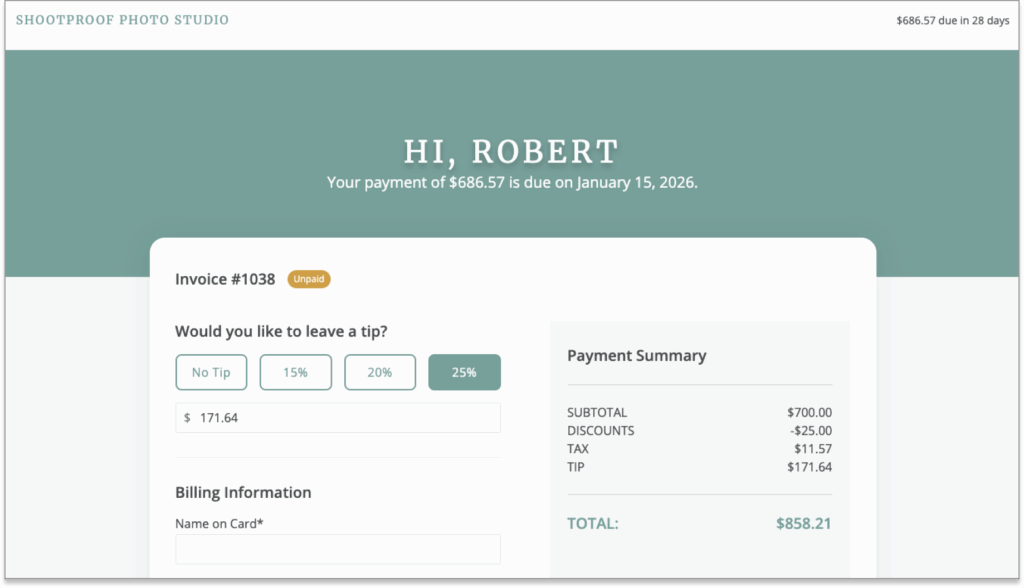
It’s incredibly simple. You can add a tipping option to any invoice you send—and your clients add a tip right where they’re already paying, making it seamless and professional.
No more awkward Venmo requests. No more “I’ll get you next time” promises that never materialize. Just a clean, optional tip field that lets satisfied clients show their appreciation in the way that matters most.
You’re In Complete Control
Not every photographer wants to use tipping for every service, and that’s totally fine. You decide when and where to enable it. Use it for all your invoices, just for certain types of sessions, or only for clients you have a great rapport with. It’s completely up to you.
And here’s the best part: tips go straight to you with no additional ShootProof fees (just standard payment processing). They’ll show up in your revenue reports alongside your other income, making tax time that much easier.
Ready to Enable Tipping?
Getting started is simple. Just head to your invoice settings and toggle tipping on when creating an invoice. You can leave the default percentage amounts or customize them—that’s up to you. You can also choose to make tipping available on every payment, or just the final payment, when your invoice contains installments. When you send the invoice, your client will see the option to add a tip. That’s it.

You’ve earned it. Now it’s time to actually receive it.
We Also Completely Rebuilt the Invoice Experience
While we were at it, we didn’t just add tipping—we rebuilt our entire invoice system from the ground up. Getting paid for your work isn’t just nice to have—it’s what keeps your photography business alive. Whether you’re collecting session fees, securing deposits, selling prints, or charging for those last-minute client requests, smooth invoicing is the backbone of your cash flow.
Along with the release of tipping, ShootProof invoices now have a modern, responsive interface designed to work seamlessly on any device. Here’s what we’ve improved:
A Smarter Studio Dashboard
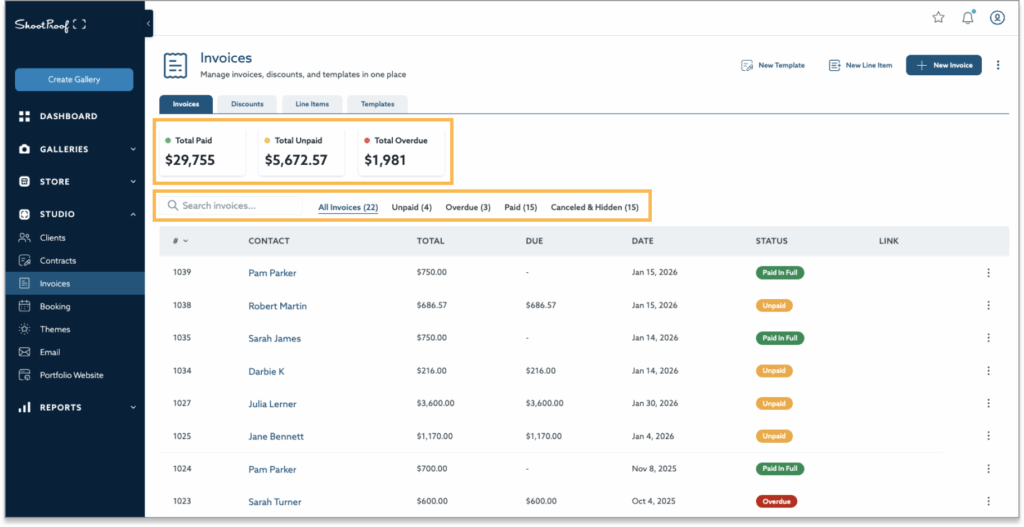
Your invoice dashboard now includes better filtering and search capabilities, so finding that specific invoice from three months ago takes seconds instead of scrolling endlessly. We’ve also added a financial overview that gives you instant insight into your revenue without having to navigate to Reports.
Streamlined Editor Experience
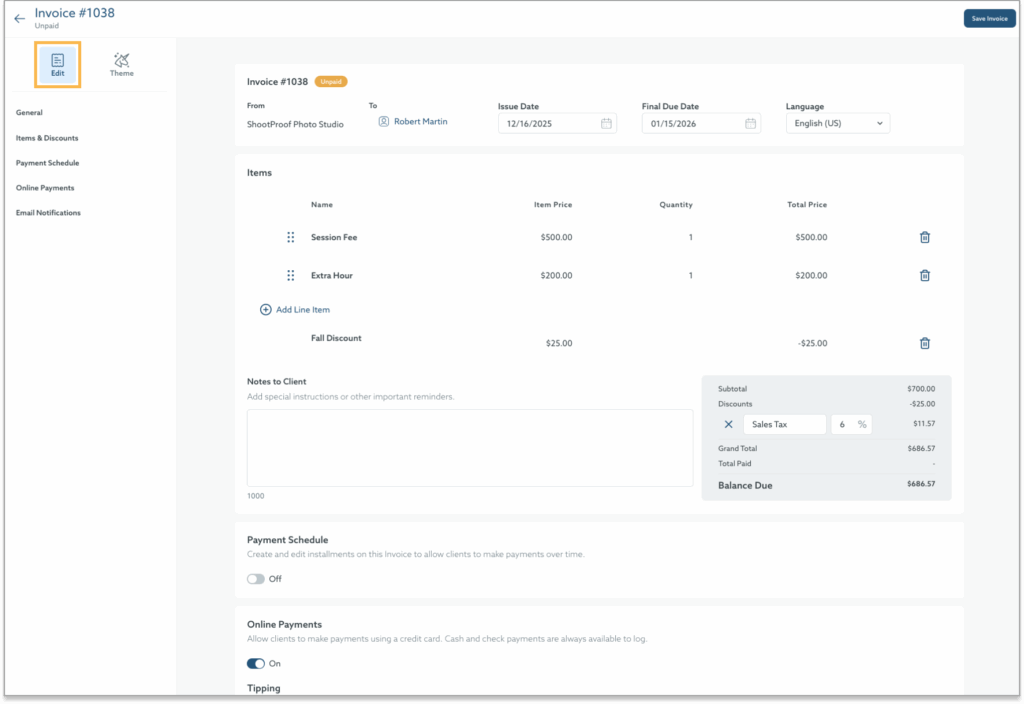
The new invoice editor opens as a full-page modal with custom branding options for every invoice and a desktop and mobile preview.

Enhanced Client Checkout
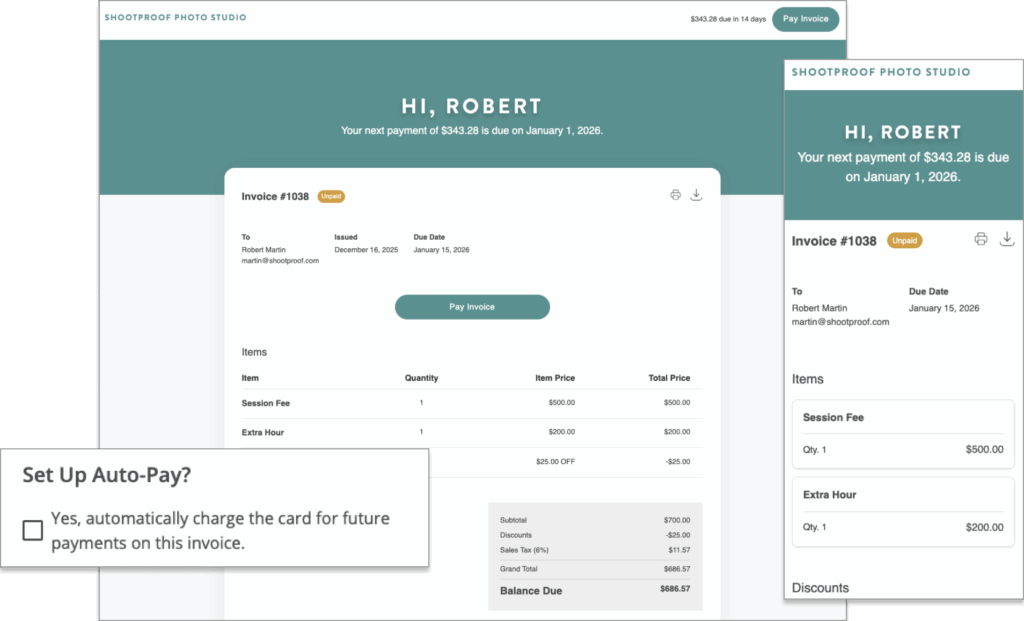
We’ve rebuilt the client payment experience from the ground up. Your clients can now set up AutoPay directly during checkout, and the entire payment process is mobile-optimized for maximum convenience. Fewer steps, less friction, faster payments.
Getting Started With the New Invoices
Do you need to inform your clients about these changes?
Nope! These updates are visual and functional improvements to your invoice experience. We haven’t changed how clients use or experience ShootProof—we’ve just made everything work better for both of you.
The Bottom Line
These updates represent our commitment to helping you run a more professional, more profitable photography business. Between the ability to capture tips, the streamlined workflow, and improved client experience, you have everything you need to invoice with confidence.
You’re already doing exceptional work. Now your invoicing system reflects that—and helps you get paid what you’re worth.
Questions about the new tipping feature or invoice experience? Check out our Help Center or reach out to our support team—we’re here to help.
Thanks for helping us make ShootProof better,
The ShootProof Team
Contributor